 Products Home
Motorized Filter Wheels, Stepper Motor Driven
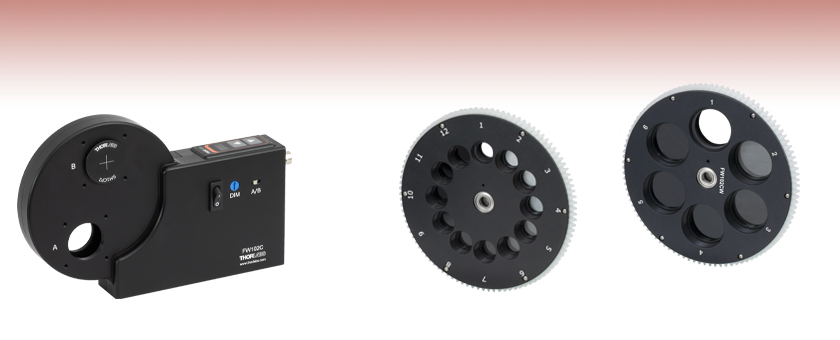
- 6- and 12-Position Filter Wheel Options
- Remote or Manual Operation
- Programmable Filter Sequences
- Interchangeable Filter Wheels
FW102C
6-Position Filter Wheel System
for Ø1" Optics
FW212CWNEB
Additional 12-Position Filter Wheel for Ø1/2" Optics
(Also Available Without ND Filters)
FW102CWNEB
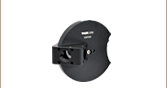
Additional 6-Position Filter Wheel
for Ø1" Optics (Also Available
Without ND Filters)



Please Wait

Click to Enlarge
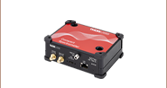
The filter wheel housing contains top-located push buttons for manual filter selection as well as a USB interface, BNC input/output, and an RS-232 connection for remote operation. It is also compatible with our 30 mm cage systems.
| Motorized Filter Wheel Selection Guide | ||||
|---|---|---|---|---|
| Item # | # of Slots | Filter Size | Preloaded ND Filters | Features |
| FW212C | 12 | Ø1/2" (Ø12.5 mm) | No | BNC, RS-232 and USB Interfaces Integrated Controller |
| FW212CNEB | 12 | Ø1/2" (Ø12.5 mm) | Yes | |
| FW102C | 6 | Ø1" (Ø25 mm) | No | |
| FW102CNEB | 6 | Ø1" (Ø25 mm) | Yes | |
| FW103H | 6 | Ø1" (Ø25 mm) | No | 55 ms Switching Time |
To switch out filter wheels, simply remove the housing cover and place in the new wheel. Replace the cover and, if necessary, hold the top-located arrow buttons to open the mode select menu and change the filter setting from a 6-position wheel to a 12-position wheel or vice versa. Hold the buttons down again to resume normal operation with the new wheel.
Features
- Motorized Housing Contains 6- or 12-Position Filter Wheel
- 6-Position Wheels Accept Ø1" (Ø25 mm) Filters up to 0.25" (6.35 mm) Thick
- 12-Position Wheels Accept Ø1/2" (Ø12.5 mm) Filters up to 0.25" (6.35 mm) Thick
- Locally or Remotely Controllable via BNC, RS-232, or USB Interface
- Spare Wheels Available With or Without Preloaded Absorptive Neutral Density (ND) Filters
- SM1-Threaded (1.035"-40) Access Ports
- Compatible with 30 mm Cage Systems (See Photo to the Right)
- One 8-32, One M4, Two 1/4"-20, and Two M6 Taps for Post Mounting
These stepper-motor-driven filter wheels are designed for use in a host of automated applications including color CCD photography, fluorescence microscopy, and photometry. Each unit consists of a motorized housing and a preinstalled filter wheel with either 6 positions for Ø1" (Ø25 mm) optics or 12 positions for Ø1/2" (Ø12.5 mm) optics. Filter wheels of either type can also be purchased separately and installed by the user.
The housing contains two ports equipped with internal SM1 (1.035"-40) threading on both sides to accommodate our Ø1" lens tubes; each port is also surrounded by four 4-40 tapped holes on both sides for compatibility with our 30 mm cage systems, as shown in the image to the right. The 12-position motorized filter wheels for Ø1/2" optics (Item #'s FW212C and FW212CNEB) also come with four SM1A6FW adapters for converting the two SM1-threaded ports to an internal SM05 (0.535"-40) thread.
Interchangeable Filter Wheels
Additional 6- or 12-position filter wheels are available below with or without preloaded absorptive, uncoated ND filters. The motorized housings are compatible with both types of wheels. Refer to the animation below to see how to switch between the different filter wheel options.
Manual or Remote Operation
The filter position can be manually selected using the push button arrows on the top of the unit or remotely selected using the USB 2.0 interface, BNC input, or RS-232 connection (please see chapter five of the manual). The BNC input rotates the filter wheel when a TTL-level signal is applied. This BNC connection can also be configured as an output trigger in the software. An easy-to-read display indicates the filter selection. The display intensity can be adjusted, making this filter wheel appropriate for light-sensitive environments.
Automation of filter sequences is available through the USB 2.0 or RS-232 interfaces along with a simple-to-use GUI application program. A simple command language facilitates the filter selections and the retrieval of filter status. For driver software, as well as an SDK manual and sample code for LabVIEW™ and Visual C++, please see the Software tab. Older versions of the motorized housing sold before April 23, 2014 may require a firmware update, which is also available for download from the Software tab.
Mounting Options
As described above, each filter wheel port is internally SM1 threaded, allowing for easy connection to externally SM1-threaded optomechanics. Four 4-40 taps are also centered around each port, making the filter wheel compatible with our 30 mm cage systems. Thorlabs offers an extensive selection of adapters for mating our SM1-compatible components to other threads, such as C-mount, microscope, and telescope standards. The bottom of the housing features one 8-32 tap, one M4 tap, two 1/4"-20 taps, and two M6 taps, creating a multitude of options for mounting the filter wheel housing to a Ø1/2" or Ø1" post.
| Key Specificationsa | ||
|---|---|---|
| Item # | FW102C FW102CNEB |
FW212C FW212CNEB |
| Filter Diameters Accommodated | 1" (25 mm) | 1/2" (12.5 mm) |
| Filter Thicknesses Accommodated | ≤0.25" (6.35 mm) | |
| Access Time for Adjacent Locations (Typical) | <1 s | <0.5 s |
| Clear Apertures | 0.90" (22.9 mm) | 0.40" (10.2 mm) |
| Accuracy/Repeatability | ±2° | |
| Performance Specifications | ||
|---|---|---|
| Item # | FW102C(NEB) | FW212C(NEB) |
| Access Time (Adjacent Locations) | <1 s (Typical) | <0.5 s (Typical) |
| Access Time (Other Locations) | 2.5 s (Typical) | |
| Accuracy / Repeatability | ±2° (Typical) | |
| Expected Cycles | 1.5 x 10⁶ (Min) | |
| Physical Specifications | ||
|---|---|---|
| Item # | FW102C(NEB) | FW212C(NEB) |
| Number of Filter Slots | 6 | 12 |
| Compatible Filter Diameter | 1" | 1/2" |
| Compatible Filter Thickness | ≤0.25" (6.35 mm) | |
| Clear Aperture | 0.90" (22.9 mm) | 0.40" (10.2 mm) |
| Trigger Jack | BNC Female | |
| Power Jack | Male 2.1 mm | |
| USB Connector | Mini B | |
| Mounting | 1/4"-20 (2 Places), 8-32, M6 (2 Places), M4, SM1 (1.035"-40) Threading (2 Places) |
|
| Filter Diameter | 1" (25.4 mm) | |
| Max Planar Filter Width | 0.25" (6.35 mm) | |
| Operating Temperature Range | 0 to 60 °C | |
| Dimensionsa | 5.44" x 1.85" x 4.39" (138 mm x 47 mm x 112 mm) |
|
| Weight (Not Including Power Supply) | 1.65 lbs (0.75 kg) | |
- Detailed dimensions are available by clicking the red Docs icon (
 ) below.
| Electrical Specificationsa | |||
|---|---|---|---|
| Parameter | Min | Typical | Max |
| BNC Input Triggerb - Max Rate | - | - | 0.5 pulses/sec |
| BNC Input Triggerb - Minimum Pulse Width | 1.0 ms | - | - |
| BNC Input Triggerb - Input High | 3.3 V | 4.5 V | 5.3 V |
| BNC Input Triggerb - Input Low | -0.3 V | 0.0 V | 1.0 V |
| BNC Output Trigger - Output Pulse Width | 9.0 ms | 10.0 ms | 11.0 ms |
| BNC Output Trigger - Output Highc | 2.5 V (1 kΩ) |
3.3 V (1.95 kΩ) |
5.0 V (Hi Z) |
| BNC Output Trigger - Output Lowc | 0.0 V | 0.0 V | 1.0 V |
| Power (DC Input, 1 A) | 11.4 VDC | 12 VDC | 12.6 VDC |
Computer Control Connections
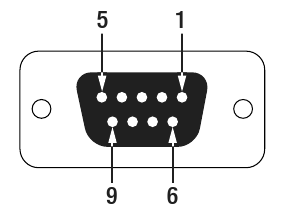
D-Sub Female
USB 2.0 Mini-B
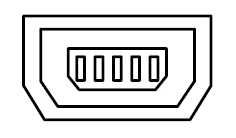
6' (1.83 m) Long Type A to Mini-B Cable Included
BNC Input*/Output Trigger
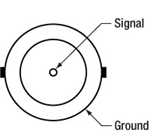
*5.3 V Max Input
| Pin | Connection | Pin | Connection |
|---|---|---|---|
| 1 | N.C. | 6 | N.C. |
| 2 | TR2 (From Housing) | 7 | Connected to Pin 8 |
| 3 | RX2 (To Housing) | 8 | Connected to Pin 7 |
| 4 | N.C. | 9 | N.C. |
| 5 | Signal Ground |
Software for the Motorized Filter Wheel Family
Below are links to the latest versions of the software and firmware for the FW102C Series and FW212C Series Motorized Filter Wheels. The software download page also offers an SDK manual and sample code for interfacing with the FWxx2C filter wheels using LabVIEW™ and Visual C++. Please see the Programming Reference tab on the software download page for more information and download links.
Software
Version 5.0.0 (January 20, 2021)
This package installs the filter wheel software and GUI. The software is compatible with Windows 7 (32-bit and 64-bit) and Windows 10 (32-bit and 64-bit)

OR
Firmware Update
Version 1.07 (May 4, 2015)
Click on the link below to download the latest version of the firmware.
To perform this update, the Motorized Filter Wheels must be connected to the USB port on a PC.

| Posted Comments: | |
Taynara Oliveira
(posted 2024-03-11 17:15:26.85) Dear Thorlabs Team,
We would like to couple several filters in the FW102C; however, our system is caged. The short-pass filters that will be added to this motorized filter wheel should reflect the light at 90 degrees from the path of incidence. Therefore, either the filter wheel or the filters need to be positioned at a 45-degree angle. Is it possible to achieve this with this motorized filter wheel? Would we need some kind of adapters to place them at 45 degrees? ksosnowski
(posted 2024-03-11 04:17:16.0) Hello Taynara, thanks for reaching out to Thorlabs. We have designed CDFW5 for holding dichroic filters at 45deg however we have not made a motorized version yet. Unfortunately, I do not think the S3A angled cage rods will be effective for mounting the FW102C at 45deg. This wheel was also not designed for the angle and the effective clear aperture will be reduced due to the thickness of the device and standard 1" optic aperture for normal incidence. I have reached out directly to discuss your application in further detail. John Rahn
(posted 2023-12-19 13:36:57.067) I would like to operate my filter wheel (FW102C) using my standard 64-bit Python (v 3.10O. However, the DLL, "FilterWheel102_win32" only works with 32-bit Python. Is there a 64-bit version of the DLL available? ksosnowski
(posted 2023-12-19 05:40:31.0) Hello John, thanks for reaching out to Thorlabs. We have not yet developed a dedicated 64 bit Python driver for the FWxC software however it may be possible to use Ctypes to load the 64 bit C++ drivers for this type of application. I have reached out directly to discuss this application in further detail. X Li
(posted 2023-09-18 22:33:43.23) Can I set the rotation direction with LabVIEW? For example, I want to change filters from 2 to 12 as 2, 3, ..., 11, 12. However, now FW212 rotates as 2, 1, 12.
Rotating in the opposite direction will let unexpected, intense light pass through the wheel. It may damage my detectors. ksosnowski
(posted 2023-09-20 12:29:18.0) Thanks for reaching out to Thorlabs. Currently the filter wheel firmware does not allow choice of a specific travel direction. However, one can command individual slots in series to ensure a specific path is followed on the wheel, in case any empty slots are used, to prevent overexposing a sensor downstream. I've reached directly out to discuss this further. Elizabeth Bullard
(posted 2023-09-07 13:26:07.237) Hi,
I see below that someone asked about using the FW212C with micro-manager. I'm having the same issue with it not recognizing 12 positions. I am using the most recent Thorlabs driver for the filter and the ThorlabsFilterWheel adapter from u-manager. I do not see where to change the Set Position Count command. ksosnowski
(posted 2023-09-13 11:24:55.0) Hello Elizabeth, thanks for reaching out to us. While we do not officially support MicroManager and Thorlabs is not the author for that Filter Wheel driver, we have looked over the public source code for this driver and notice a line Robert Hay
(posted 2023-05-31 10:08:17.093) Could you please advise as to the availability of Part FW102. Has this ben replaced with Part FW102C? If so, what are the differences between these two parts? cdolbashian
(posted 2023-06-01 04:47:27.0) Thank you for your interest in our products. There were many small changes between the obsoleted FW102 and the current FW102C. I have compiled these changes and emailed you to discuss them and possible alternatives to this obsolete product. Francois Laforge
(posted 2023-03-31 10:27:23.73) I have several FW102C but one on them is broken.
The filter wheel doesn't turn on at all when plugged to a 12V power supply (I checked the Power Supply with another FW102C which was working). No communication no possibility of manually actioning it either.
Could I replace the electronic board with a new one? ksosnowski
(posted 2023-04-12 12:17:55.0) Hello Francois, thanks for reaching out to Thorlabs, and sorry to hear of this issue. We recommend contacting techsupport@thorlabs.com directly in cases like this to discuss a return for inspection. This issue is not common however if there is no response to other working power supplies, it may be due to an issue on the board. We build these in-house so can evaluate and repair as necessary. I have reached out directly to discuss this further. Recep Balbay
(posted 2023-02-20 22:16:49.597) Hello,
I want to control FW102C from python in 64-bit mode.
When I was trying load related dlls, everthing seems fine but try connect to fw software crashes/freeze.
But 32-bit dll works charmly. I have to use 64bit...
Software version 5.0.0. Should I downgrade? or What you suggest?
PC: Win10 Enterprise (64-bit) ksosnowski
(posted 2023-03-08 02:07:42.0) Hello Recep, thanks for reaching out to Thorlabs, and sorry to hear of the issues here. For inquires like this we recommend contacting techsupport@thorlabs.com directly. While our Filter Wheel Software does not have specific Python drivers, with the correct packages you can still use our existing drivers in this Python. While we have not heard of any bugs in the current version 5.0.0 software, you can try one of the archived versions here: https://www.thorlabs.com/software_pages/viewsoftwarepage.cfm?code=FW102C&viewtab=4. I have reached out directly to discuss this further. V Ten
(posted 2022-09-27 14:52:04.77) What is the expected reproducibility of the x-y position, the tilt and z-location of the filters? ksosnowski
(posted 2022-10-07 01:50:45.0) Hello, thanks for reaching out to Thorlabs. The repeatability for the FW102Cx/FW202Cx series is ±2° (Typical). We have not measured the exact X/Y/Z/Theta repeatability of the filter positions, but this could also vary depending on the mounting of filters in the unit. These are designed for 1" and 1/2" filter optics respectively, and for applications where the exact positioning will not be critical. Overall we have not heard complaints on the positional accuracy of these, though this could be due to the setups in which they are often used. If the goal is to use pinhole apertures in this, the MPH series pinhole wheels may be a better option. For these we have ±5.1 µm positioning accuracy, however we do not have an exact Z or theta positioning specification. I have reached out directly to discuss your application further. Samuel Li
(posted 2022-07-15 16:38:45.56) Overnight, our filter wheel has stopped working. When changing the selected filter, it moves back and forth, and gives an error E3. It always stops on even-numbered positions only. How should we fix the issue? cdolbashian
(posted 2022-07-26 02:48:08.0) Thank you for reaching out to us with this inquiry. I am sorry to hear that you are having trouble with your device. Based on our discussions, it seems like the opto-interrputer, responsible for locating the correct wheel position, has failed. Please reach out to techsupport@thorlabs.com to start an RMA to have this repaired.. Sanjay Gusain
(posted 2022-04-14 12:04:45.497) You are missing out on a big amateur astronomer market by not having Linux drivers for this filterwheel. Lot of amateur people use raspberry pi to acquire images and run filterwheels.
We ourselves were thinking of buying 10 suc wheels but after prototyping we would have to look for alternative vendors who provide Linux drivers. ksosnowski
(posted 2022-04-21 06:05:04.0) Thanks for reaching out to Thorlabs. The USB port connection for these filter wheels uses an FTDI chip, for which you can find drivers online here: http://www.ftdichip.com/Drivers/VCP.htm. You will not need a specific driver if you use the RS-232 connection. Unfortunately, we don't officially support Linux for this FW102C software currently, but you can refer to the serial port commands and settings in the manual for more information in order to write your program for serial communication. Jolyon Zook
(posted 2021-08-18 14:38:09.387) The API is missing an important feature: getting the handles of any open devices. If my labview test program crashes before the COM port is closed (a frequent occurrence during development), it becomes impossible to communicate with the filter wheel until Labview is restarted. This is a major inconvenience. Please either add a separate function that does this, or add an output to the "List" function that not only lists the available devices, but their associated handles if open. cdolbashian
(posted 2021-09-10 12:10:30.0) Thank you for contacting Thorlabs! We truly appreciate this type of feedback. I have contacted our development team with this information and we are planning to include this in future releases of our supporting SDK. yo uz
(posted 2021-04-11 22:57:06.84) Can I control the filter wheel from matlab? If so, where can the drivers be found cdolbashian
(posted 2021-05-12 05:43:27.0) Thank you for contacting ThorLabs! While we do not currently have any Matlab examples for these controllers, we do expect that these would be controllable using the low-level commands found in the manual. These commands would be sent using the Serial Port object in matlab. I have reached out to you directly with more details regarding your application. user
(posted 2021-03-23 05:47:09.76) Hi, is your optic filter kit FBK-vis-10 with mounted 1" filters compatible with the motorized wheel FW102C?
Thanks YLohia
(posted 2021-03-23 10:24:30.0) Hello, the FW102C is specified to accept filters up to 6.35 mm thick. The filters in the FKB-VIS-10 kit are specified for <6.3 mm thickness. These items will be compatible. John Liang
(posted 2021-03-09 13:00:56.733) After using it for a couple of months, why my FW212C is sounding not well with large noise? asundararaj
(posted 2021-03-11 12:10:08.0) Thank you for contacting Thorlabs. I have contacted you directly to troubleshoot your filter wheel. Alexander Kuznetsov
(posted 2021-01-27 14:53:54.023) Hi, I'm considering an FW212C for some automated measurements and would like to know if there are any c# (.NET) specific drivers and programming guides? Thanks in advance. asundararaj
(posted 2021-02-05 01:06:59.0) Thank you for contacting Thorlabs. While we do not have a C# specific SDK, you are able to use the ,NET SerialPort Class in the System.IO.Ports.dll assembly to connect to the device COM port . This would allow you to send the serial commands from page 8 of the software manual. user
(posted 2020-04-27 13:23:10.327) 我在贵站下载了FW212C的SDK,发现C++的SDK只有x86版,而没有x64版的。我们现在需要使用x64版的C++SDK。
请问,我该如何得到X64版的C++SDK文档?
如果贵公司有X64版的C++SDK文档,请将其发到我的电子邮箱,在此谢过! YLohia
(posted 2020-04-27 09:35:09.0) Thank you for contacting Thorlabs. An applications engineer from our team in China (techsupport-cn@thorlabs.com) will reach out to you directly. Bill Heady
(posted 2020-01-07 16:18:20.327) Has this motorized filter wheel (FW102C) ever been used in a vacuum chamber? asundararaj
(posted 2020-01-08 09:12:31.0) Thank you for contacting Thorlabs. The motorized filter wheels are not vacuum compatible, and have not been tested in vacuum. These have anodized parts that will out gas, however we would expect that even an unanodized version would have issues with other components (including electronics and grease). Claudia Ruiz
(posted 2019-07-02 08:13:16.507) Hello,
I would liike to know if the software and APIs are compatible with Linux Environment.
Thank you in advance,
Best regards,
Claudia YLohia
(posted 2019-07-02 11:29:57.0) Hello Claudia, thank you for contacting Thorlabs. The USB port connection for these filter wheels uses an FTDI chip, for which you can find drivers online here: http://www.ftdichip.com/Drivers/VCP.htm.
You will not need a specific driver if you use the RS-232 connection. Unfortunately, we don't officially support Linux for this software currently, but you can refer to the serial port commands and settings in the manual for more information in order to write your program. Jean-Baptiste Le Bouquin
(posted 2019-04-13 16:18:20.67) Hi, we need a filter wheel to load either 1" circular or 1"x1" square optics. Is it possible to remove one side of the cover of FW102C, in order to screw an adaptor for 1"x1" square optics ? Thanks. YLohia
(posted 2019-04-15 10:18:38.0) Hello, yes, it is possible to remove one side of the cover in order to thread in an SM1-compatible adapter. nh9g11
(posted 2019-02-11 11:35:04.67) Hi, I'm having trouble with getting the FW212C filter wheel to register 12 positions with micromanager software rather than 6. which is the default. I'm using the Thorlabs driver. The wheel registers 12 positions in the Thorlabs software, and operates normally. llamb
(posted 2019-02-22 03:44:06.0) Thank you for contacting Thorlabs. While we do not officially support Micro-Manager at this time, the Set Position Count command should be set to pcount=12. I have reached out to you directly to try and troubleshoot further. carlo.desanti
(posted 2018-10-22 13:35:38.39) Dear Thorlabs technical support,
is the filter wheel able to operate only in vertical position (i.e. as in the picture on the website) or also in horizontal position (e.g. connected directly to the optical path of a microscope, with the light coming from the floor and going towards the ceiling)? In the latter case, would its weigth be a problem?
Thanks, best regards. YLohia
(posted 2018-10-24 04:30:04.0) Hello, thank you for contacting Thorlabs. The mounting orientation (horizontal vs vertical) should not impact the performance of the filter wheel. trearick
(posted 2018-08-14 12:47:06.31) I need to control the filter wheel from matlab, which I could do if a 64-bit version of the windows driver were available. I see people asked for it many years ago...is one available??? YLohia
(posted 2018-08-15 02:27:36.0) Hello, thank you for contacting Thorlabs. If the latest version (4.2.0) of the software is downloaded from the webpage, then there will be a folder under the following location:
C:\Program Files (x86)\Thorlabs\FW102C\Sample
This contains a file tilted "FW203C_LVSDK.zip", which has the FilterWheel102_win64.dll file. This can be used with the FW102 SDK Manual for 64-bit development. bo.li
(posted 2018-06-13 14:13:12.013) Hello,
I am trying to work on the SDK in c++. For the provided demo, the function of get position and get mode worked fine, but 'set position' and 'set mode' gave no luck. When I input a number and pressed 'enter', the software crashed. The gui driver in windows works fine. Could you please reach me and let me know how to figure out the SDK. We do need to program it for our research purpose. llamb
(posted 2018-07-07 11:07:22.0) Hello, thank you for contacting Thorlabs. Please test those commands as serial commands as well by installing a serial terminal emulator. If serial commands do not work, then there may be a firmware issue. We have reached out to you directly to troubleshoot further and help resolve this issue. neveen.hosny
(posted 2018-02-19 17:37:12.907) Can you tell me the operating temperature of this device, I need to put it in an environment of 38C and need to make sure it will still function. tcampbell
(posted 2018-02-20 03:55:17.0) Hello, thank you for contacting Thorlabs. The operating temperature range of the motorized filter wheels is 0 to 60 °C. This information can be found in Chapter 7 of the manual. chris
(posted 2018-01-22 10:05:52.33) Hi
I have a number of these filter wheels (fw102c) and i have a problem with a few that i need help with before i buy anymore...
the wheels sit on systems that run continuously and we have found that some of the wheels reset themselves and move positions after a few hours! we have out in the software to move then ourselves every 40 minutes BUT this still happens - can you help us with a solution please?
thanks
chris hunter nbayconich
(posted 2018-04-04 09:50:09.0) Thank you for your feedback. We'd be happy to help troubleshoot this issue you are seeing where the filter wheels reset their position and move positions after several hours.
If possible we will need to know more details about how you are controlling these units such as are you controlling them simply through the FW GUI software using command sequences, are you sending commands using C++, Labview or triggering with a TTL pulse? I will contact you directly to help troubleshoot your filter wheel. For more assistance regarding technical product support please contact us at techsupport@thorlabs.com or 973-300-3000 pblackburn
(posted 2018-01-10 12:38:35.317) We have several of these filter wheels on hand and the internal wheel wobbles on all of them. No matter how tight the thumb screw is tightened, the filter wheel's bearings are never fully clamped by the two sides of the housing, allowing the plane of the wheel to wobble. This is causing issues for us, as it couples mechanical vibration to optical signal noise. I'm surprised that no one else has complained about this. Do you have suggestion to address this? We have some ideas but would like to hear what Thorlabs has to say.
Thank you. nbayconich
(posted 2018-05-08 09:04:09.0) Thank you for your feedback. In the old design we were installing shims underneath the bearings to compensate for dimensional tolerances. In March 2013 we updated the design and the use of shims was not required anymore. Chances are these filter wheels were purchased before the design update and in these units the shims were not installed properly. We can of course return and repair any of these filter wheels that have been experiencing this problem.
I will contact you directly to help troubleshoot these parts. cimrova
(posted 2017-05-16 13:36:24.637) I have FW102B and FW102C. For programming of FW102B I use command pos=1 to set position of the filter and pos? asking the position, which I send to the port. Unfortunately it is not working with FW102C. Please could you send me direct commands to use it also with FW102C.
Thank you in advance.
Best regards,
Vera Cimrova tfrisch
(posted 2017-05-19 03:27:09.0) Hello, thank you for contacting Thorlabs. I will reach out to you directly to troubleshoot this filter wheel. oded
(posted 2017-05-07 15:53:50.26) Hello,
The electrical spec says that the BNC trigger voltage is as follow:
BNC Input Trigger - Input High 3.3V - 4.5V - 5.3V
BNC Input Trigger - Input Low 0.3V - 0.0V - 1.0V
What is the minimum and maximum current needed for the trigger?
Thank you nbayconich
(posted 2017-05-22 09:20:57.0) Thank you for contacting Thorlabs. The BNC Input trigger current is less than 1µA and is only driving a logic gate. A techsupport representative will reach out to you directly. ChrissiReich
(posted 2016-11-08 08:59:05.583) What is the direct command for
"GetTimeToCurrentPos" which is described in the PDF? I can't find the syntax for direct serial communication. tfrisch
(posted 2016-11-09 09:38:32.0) Hello, thank you for contacting Thorlabs. We will contact you directly with information on this command. silvernightwave
(posted 2016-11-04 08:14:40.793) Hello again, I updated the firmware for the first of my three filterwheels. With the new firmware, my wheel is not working properly anymore. When I change between certain combinations it is "noisy" and is changing between two combinations permanantly for a couple of seconds. I had no problems with the previous firmware. Please contact me to downgrade. tfrisch
(posted 2016-11-09 09:37:06.0) Hello, thank you for contacting Thorlabs. I have contacted you directly about this firmware change. silvernightwave
(posted 2016-11-03 16:40:15.957) Hello, I wrote in 2014 about the same topic:
I waste a lot of time waiting for the filter wheels reaching the next position. Some changes take more time - therefore I have to wait at least for the maximum change time (automated system).
Is there an option to ask "reached position?" or "Moving?". If the device would be able to tell when its moving is finished, I wouldn't waste any time waiting. tfrisch
(posted 2016-11-09 09:35:57.0) Hello, thank you for contacting Thorlabs. I will reach out to you directly,but the filter wheel returns the ASCII ">" when it has reached its position. gianmaria.calisesi
(posted 2016-10-03 06:00:36.62) Hello,where can I find the labview drivers for the FW102C (both 32 and 64-bit)? Regards jlow
(posted 2016-10-03 02:02:31.0) Response from Jeremy at Thorlabs: You can find the software and programming reference at https://www.thorlabs.com/software_pages/ViewSoftwarePage.cfm?Code=FW102C francois.parnet
(posted 2016-09-13 04:34:45.15) Hi, I juste have upgraded the firmware version 1.07 on my filter wheel and since I have an error E1 or E2 displayed on the screen of the device.
Could you please send me a prior version of the device to fix this issue ?
Thank you tfrisch
(posted 2016-09-15 01:49:59.0) Hello, thank you for contacting Thorlabs. I have reached out to you directly about troubleshooting. alfred
(posted 2016-08-30 13:12:16.143) Dear Sir:
I come from Chroma ATE Inc.
I have some question for this Filter Wheel Type:FW102C - Six-Position Motorized Filter Wheel for Ø1" (Ø25.4 mm) Optics.
1.Which motor is used on FW102C?(stepping or servo)
2.As FW102C was hit and the notch shifted,how can I fix it?
Thank you. tfrisch
(posted 2016-09-06 04:40:49.0) Hello, FW102C uses a stepper motor. I will contact you directly about repairs. alfred
(posted 2016-08-26 19:12:31.79) Dear Sir:
I come from Chroma ATE Inc.
I have some question for this Filter Wheels Type:FW102C - Six-Position Motorized Filter Wheel for Ø1" (Ø25.4 mm) Optics.
As I use FW102C,but I did not find Home Function.
Does FW102C require Home Function?
If FW102C need Home Function send Dll and Sample Code to me.
Thank you. eddie.ross
(posted 2016-08-19 09:30:58.07) Would it be possible for a 2" filter wheel to be made and a range of 2" filters? huiwang.ai
(posted 2016-01-30 17:10:27.27) I need help on my FW102C. I purchased two of these in 2011. I made a stupid decision to upgrade their firmware to version 1.07 (the current one on the Thorlab website). Unfortunately, this new version seems to be incompatible with my old FW102C. After the upgrade, both of my filter wheels show error message "E1". They seem to have a problem to find their right positions. Please help, and I think your company should give a note to say the the new firmware is not compatible with old FW102C. besembeson
(posted 2016-02-01 12:42:10.0) Response from Bweh at Thorlabs USA: Although there are mechanical and electrical differences between the older units and the newer ones, there are no known issues with the FW102C and newer firmware revisions. We will further investigate this and add a note as necessary. However, we can send you the version (or one close to that) you had prior to the upgrade. hanke
(posted 2015-09-16 04:44:55.743) Hello, where can I find the 64-bit labview drivers? besembeson
(posted 2015-10-01 05:13:08.0) Response from Bweh at Thorlabs USA: We only have the 32 bit dll at the moment. I will let you know via email when we can have a 64 bit driver. oliver.larkin
(posted 2015-07-06 21:04:19.49) You may want to recess the casing so that you can use ERSCA rod mounts to hold rods in all four positions around the bottom aperture (A). At the moment i'm having to use 3/4. besembeson
(posted 2015-09-23 09:19:55.0) Response from Bweh at Thorlabs USA: That is correct. The original design was to directly accommodate ER rods. We will review this. kentelschow
(posted 2015-06-22 07:30:27.657) I am in need of motorized optical attenuators for the 30mm cage system.
Can the fw102c/fw212c be modified to rotate a continuous NDF wheel (like NDC-100C-2) with an angular resolution of 1-2 degrees under computer control? A 10mm aperture would be fine.
If so, please quote 2 devices.
Thanks besembeson
(posted 2015-09-21 01:48:19.0) Response from Bweh at Thorlabs USA: The wheel sizes are not compatible so it will require quite some modification to do this. We are in the process of developing such a motorized filter wheel but don't have a timeline yet for release. pwhit032
(posted 2015-05-04 10:54:55.917) Are the 64 bit labview drivers available? jlow
(posted 2015-05-05 09:51:10.0) Response from Jeremy at Thorlabs: A preliminary version for the 64-bit driver is available. I will contact you directly to provide this. lindner
(posted 2015-04-20 16:56:08.65) Dear ThorLabs,
We would like to use the USB version of the motorized filter wheel, but control the operation from a linux computer. Is there any driver or software support for using linux machines with this device? jlow
(posted 2015-04-28 05:00:53.0) Response from Jeremy at Thorlabs: We will contact you directly to provide Linux driver for the USB chip used. marcus.roeppischer
(posted 2015-04-08 02:17:13.25) Hello, is it possible to use the filter wheele with LabView? Is there a .dll or a LabView .vi fpr the control of the filter wheele? jlow
(posted 2015-04-14 09:50:24.0) Response from Jeremy at Thorlabs: The FW102C filter wheel can be used with LabVIEW and a sample LabVIEW VI is provided with the software. jens.ebbecke
(posted 2015-02-18 15:31:16.187) Hello,
I have a FW102 in use...or had in use because it stopped working. Not answering anymore using software and it does not move when trying to use manually by pushing the arrow buttons. I tested the power supply and this seems to be okay. Is there any fuse in this filter wheel which could be blown or which other fault could it be?
Could you please contact me by email or by phone: 0049 170 7820333. Thank you! BW J. Ebbecke jlow
(posted 2015-02-24 04:37:59.0) Response from Jeremy at Thorlabs: We will contact you directly to troubleshoot this. rsturko
(posted 2015-01-05 14:52:34.593) Hi we would like to use this filter wheel FW102C in our system and would like to know if there are any restrictions on mounting orientations. We hope to mount it horizontal but were concerned with decreased lifetime. Also, what is the lifetime rating for this unit? Thanks Ryan jlow
(posted 2015-01-12 11:14:33.0) Response from Jeremy at Thorlabs: We are still in the middle of testing for the lifetime of the unit. We will update the webpage with the lifetime rating when testing has been completed. We will contact you directly about using this in your application. rolf.broennimann
(posted 2014-12-17 07:50:00.573) Wir haben von Ihnen ein Filterrad FW102C erhalten. Schade, dass man neben der USB Verbindung zusätzlich eine Stromversorgung braucht. Man ist froh für jedes Kabel weniger.
Vorschlag: Erweiterung der Elektronik, so dass der den Motor auch über USB betrieben werden kann. Nötigenfalls, da über USB nicht viel Leistung bezogen werden kann, den Motor(anderer Motor/Getriebe) langsamer laufen lassen.
Oder nur USB -> langsam
Mit Stromversorgung -> schnell
MfG Rolf Brönnimann jlow
(posted 2014-12-17 10:50:30.0) Response from Jeremy at Thorlabs: Thank you for your suggestion on powering the FW102C. We will look into this possibility in the future. ajgonsalves
(posted 2014-09-08 17:51:54.61) I have 3 usb filter wheels attached to 1 computer. Two of them work fine but the third is an unknown device in device manager (win7) unless the other two are off. Any ideas? jlow
(posted 2014-09-18 11:20:50.0) Response from Jeremy at Thorlabs: If the one is working by itself, then the filter wheel is probably working fine. I will contact you directly to troubleshoot this. jeremy.manning
(posted 2014-08-12 14:28:16.643) We would like to use the 102C by mounting it between a c-mount camera and lens (Camera mounted to side 1 of the filter wheel and variable zoom lens mounted to side 2 of the wheel). Do you carry any COTS assemblies or optics to allow this to work (proper focus-shift compensation for the extra distance from camera-to-lens, etc.)? We are tying to keep it as simple, cheap, and compact as possible. jlow
(posted 2014-08-21 01:10:24.0) Response from Jeremy at Thorlabs: We do not have an off-the-shelf component for this at the moment. We will contact you directly about possibly implementing this another way. sc13967
(posted 2014-02-10 18:06:57.73) Hi, is it possible to use this device with the cover off? We would like to attach short (~1" lens tubes) to the filter wheel at 5 of the 6 positions. This would allow us to use this wheel to alter the relative position of 5 identical lenses (move the focal point). Thanks, Stephen. jlow
(posted 2014-02-10 01:44:14.0) Response from Jeremy at Thorlabs: The FW102C can be operated with the cover off. I would recommend using this in a clean area so dust and dirt is not a concern. Silvernightwave
(posted 2014-02-02 18:16:33.05) Hi, i'm using the wheel with labview. Is there a possibility to check if the wheel is finished moving? For example when i'm setting a new position i would like to pause my programm untill the position is reached.
br cdaly
(posted 2014-02-11 12:16:36.0) Response from Chris at Thorlabs: There are set position commands; POS=n and POS? POS=n; moves the wheel to the filter position n. POS? will retrieve the latest position; although it must be constantly polled. There is currently no command that will perform the instant feedback of the filter position. If this command is required we will need to investigate further and see if it is possible to add to the existing command set. user
(posted 2013-09-03 18:21:54.9) I would like to control via RS232/USB the wheel so to move it in angular positions not necessarily correspondent to the 6 filters.
Is this possible? jlow
(posted 2013-09-04 11:34:00.0) Response from Jeremy at Thorlabs: With the current firmware, this is not possible at the moment for any arbitrary location. You can do it in 1/2 step though. To do that, send the command "pcount=12". Position 2 would then be filter 1, position 3 would be half way between filter 1 and 2, position 4 would be filter 2 and so on. Silvernightwave
(posted 2013-08-07 10:03:49.5) Hi,
can you upload 64 Bit version of your labview drivers? I have to use labview 64 bit and unfortunatly your drivers don't work jlow
(posted 2013-08-14 14:00:00.0) Response from Jeremy at Thorlabs: Thank you for contacting Thorlabs. Unfortunately we do not have 64-bit drivers for this yet. We are currently working on this and we will upload this to the website when it is available. We will contact you to discuss about this further. abel.chang
(posted 2013-07-24 04:49:47.847) FW102C shows the error code E0 on the LED display. I can't manual it.
When turn off FW102C and change the wheel position, it works abnormally.
Not all wheel position can be controlled.
One wheel position always causes E0 message and fails to rotate.
What happened to my FW102C? cdaly
(posted 2013-07-24 17:11:00.0) Response from Chris at Thorlabs: Please try updating to the latest version for the firmware (1.05). If the problem persists or you are already using this version, please contact us at techsupport@thorlabs.com to further troubleshoot the issue. The firmware can be found here: http://www.thorlabs.com/software_pages/ViewSoftwarePage.cfm?Code=FW102C&viewtab=1 jlow
(posted 2012-10-11 16:43:00.0) Response from Jeremy at Thorlabs: You can control the FW102C through MatLab via a command line interface. The settings for the COM port is laid out on page 10 of the manual (http://www.thorlabs.com/Thorcat/20200/FW102C-Manual.pdf). The syntax and the commands are on page 11. You can also accomplish this via the ActiveX control. The ActiveX methods are laid out on page 12 of the manual. If you want to convert the C++ code to MatLab, you could possibly accomplish that through the MEX-function in MatLab. hwei
(posted 2012-10-10 09:09:57.597) Hi,
I understand that the software support LabView and C++. I'm just wondering if I can control the wheel from Matlab.
Thanks.
Hong Wei tcohen
(posted 2012-09-13 16:02:00.0) Response from Tim at Thorlabs: If your FW102C is having difficulty cycling through the filter positions and the display is reading E1, it may be an internal mechanical problem indicating friction in the rotation. I will contact you to get more information so that we can provide you with a corrected unit as soon as possible. jscheuch
(posted 2012-09-13 15:11:41.0) I am using the FW102C and I received the error code E1 on the LED display. What does this code mean? bdada
(posted 2012-05-31 18:47:00.0) Response from Buki at Thorlabs:
We were successful in communicating with and controlling the filter wheel with uManager. Please check the baud rate under the configuration; if you did did not change it from the default setting of 9600 it will not work unless you previously changed the baud rate setting of the Filter Wheel.
Please contact TechSupport@thorlabs.com to discuss this further. bdada
(posted 2012-05-31 16:13:00.0) Response from Buki at Thorlabs:
Thank you for your feedback. I'm sorry you're having a problem using the FW102C with uManager. We are currently running some tests and will provide more detailed results shortly that will hopefully resolve the issue you're experiencing. We do not have your contact information, so please email TechSupport@thorlabs.com if you want to have direct communication with us and a Software Engineer regarding this issue. user
(posted 2012-05-30 17:35:24.0) We purchased the filter wheel FW102C and thought it can be used with uManager. Unfortunately, it doesn't work on our hand. The software can recognize the COM and the filter wheel in the setup process. However, there is no hardware response (i.e. wheel switch) when capturing. Does anyone (or the manufacturer) have a way to make it work? At the same time, others need to be cautious if you want to purchase filter wheels to pair with micromanager. TOFRA has cheap filter wheels that we have tested to work with uManager. tcohen
(posted 2012-05-24 15:05:00.0) Response from Tim at Thorlabs: Thank you for your feedback! Some noise can occur in the device based on the play in the gears and does not indicate a problem. In addition, the filter wheel can be discriminatory positioned clockwise or counterclockwise. I will contact you to see if your device is operating normally or needs repair and to provide information on the control. alee
(posted 2012-05-23 07:09:53.0) Hi, I have been using a FW102C for a few months now and am starting to have a few problems, when moving the wheel in one direction it works fine, when I try and move the wheel in the other direction the move is much noisier and takes longer, do you know what is causing this and if it is damaging the wheel? This happens regardless of whether I use the actual buttons on the filter wheel or move it programatically. Is there a way of forcing the filterwheel to move in one direction only using serial communication, i think at the moment the filter wheel just takes the quickest route to it's new position in my program. tcohen
(posted 2012-04-19 17:09:00.0) Response from Tim at Thorlabs: Thank you for your feedback! ActiveX components will not run within a 64bit client environment. However, drivers are included with the software package and the FW102C can be used with command line language through the RS232 port. tcohen
(posted 2012-03-28 14:27:00.0) Response from Tim at Thorlabs: Thank you for your feedback. The FW102C has an accuracy of +/- 2 degrees. plascottages
(posted 2012-03-27 08:43:04.0) Do you have any data on the positioning accuracy of the wheel. I would like to use the device for selecting between different masks - each etched into a 1" diameter disc - but I need to check how well each will be positioned. bdada
(posted 2012-02-08 20:53:00.0) Response from Buki at Thorlabs to huiwang.ai:
Thank you for your feedback. To use the FW102C as a shutter or "block", you would need to fill one of the filter wheel positions with an SM1PL - SM1 Plug. You could then use Micro Manager to move the wheel to the position which has the SM1PL installed in order to "block" the light.
We have contacted you for further support. huiwang.ai
(posted 2012-02-01 16:42:33.0) We now have two FW102C in the lab in one system. They are doing their job well. We hope to get two other filter wheels to control the light path of our other fluorescence microscope (one excitation, one emission). We also hope that we can use a "block" filter in the wheel to work as a shutter. We did some investigation, and found that the ones from Sutter can do this (see the link below). We tried our own FW102C, and cannot figure out how to do the job. Now I believe it needs some work on the uManager software adapter. Could you possibly help us on that?
http://micro-manager.3463995.n2.nabble.com/filter-wheel-as-shutter-tt4952897.html#none bdada
(posted 2011-10-31 16:07:00.0) Response from Buki at Thorlabs:
Thank you for using our feedback tool. It sounds like you are trying to control the filter wheel through the ActiveX control. We have a list of ActiveX methods which can be found on page 12 of the manual at http://www.thorlabs.com/Thorcat/20200/20242-D02.pdf. The methods are only used to do text-based control.
While we do not provide full support for 3rd party software, please do not hesistate to contact TechSupport@thorlabs.com for further assistance. eugene_l
(posted 2011-10-24 06:19:50.0) I couldn't use AxtiveX contol in Java. May be you replace your ActiveX control(OCX) on ActiveX object (simple COM object). How I think, your ActiveX control is not used to display any visual information.
Eugene B. user
(posted 2011-10-21 21:16:20.0) I couldn't use AxtiveX contol in Java. May be you replace your ActiveX control(OCX) on ActiveX object (simple COM object). How I think your ActiveX control is not used to display any visual information.
Eugene B. jjurado
(posted 2011-06-27 17:55:00.0) Response from Javier at Thorlabs to zwizhy: Thank you very much for contacting us. You can certainly use the same code you developed for the FW102B with the FW102C filter wheel. The communications protocol is identical for both B and C versions. zwizhy
(posted 2011-06-27 00:57:49.0) Hello, I made a code for fw102b with the api from the manual. can i use the code directly to control a fw102c? Hope your reply. Please answer quickly . Thank You. Customer Email: zwizhy@gmail.com This customer would like to be contacted. bdada
(posted 2011-06-09 12:37:00.0) Response from Buki at Thorlabs:
Thank you for your feedback. The internal threading on the FW102C is SM1 (1.035"-40) and the tolerance is ±0.005". These are meant to hold regular 1" optics, depending on the tolerance of the optics you use.
Please contact TechSupport@thorlabs.com if you have more questions about this matter. rmontminy
(posted 2011-06-07 15:24:27.0) Filter wheels specify they hold 1" diameter filters but dont actually call out a tolerance in the available literature. We use this wheel with off the shelf filters and sometimes they dont fit so were forced to sand the edges of the filters. I would assume these wheels are meant to hold commercially available 1" optics? bdada
(posted 2011-04-29 12:29:00.0) Response from Buki at Thorlabs:
Thank you for your feedback. The FW102C has SM1 (1.035"-40) threading. If your light source is threaded, you can use one of our adapters to mount your light source to the FW102C filter wheel. Please review our selection of adapters by using the following link: http://www.thorlabs.com/NewGroupPage9.cfm?ObjectGroup_ID=1524.
If your light source is unthreaded or if you have further questions, please contact TechSupport@thorlabs.com user
(posted 2011-04-28 21:03:48.0) Hi, i want to use this filter wheel to select light from Sutter Lambda LS, do you have any suggestions on which mounting adaptors should I order? I want to save some money, since the Sutter system (controller + filter wheels) is very expensive. jjurado
(posted 2011-03-15 14:27:00.0) Response from Javier at Thorlabs to carsten.schmidt: Thank you for submitting your inquiry. You can try updating the firmware to the latest version; however, if the wheels really have several 100,000 cycles on them then they are getting very close to the end of their life and the firmware update will not help. The loss of communication and the need to cycle the power is an indication that the FW102B is not completing the commanded move. This occurs more frequently as the wheel ages. The latest firmware is a little more robust in trying to force the wheel to complete the move, but even this does not work all the time. The FW102C will not have this issue, as its life time is much longer than that of the FW102B.I will contact you directly for further support. carsten.schmidt
(posted 2011-03-15 17:01:59.0) Hi. I am using a couple of FW102B and FW102C since the year 2008. I am frequently experiencing the same problems as smcmanus and guspank: I am loosing the connection to filterwheel after a couple of hours. My workaround was to include a relay, which switched off the power to the FW. After 10 seconds power was restored and everything was fine again. Now Ive got a couple of questions:
1) I have one system, where this doesnt work anymore. It can take hours or even a reboot to reestablish the communication. The specific fw102b dates back to 06/2009, application s/w update from vs1.0 to vs1.02 (my newest version) didnt help. The fw worked more or less fine with the error occuring only once every three months, but now it occurs everyday. In an older post I read a firmware update might help? My issues got worse after I changed the instruments setup (more data is forced through the USB ports). Three other fw102b work fine with the new setup.
LabView Errors are:
Driver Status: (Hex 0xBFFF0015) (time out?) and (Hex 0xBFFA1190) The session handle is not valid.
2) The fw was excessively used (hundred thousands of revolutions). Has it possibly reached the end of its expected lifetime? How do I notice if a fw does?
3) My FW102C are realtively new. Do I have to expect the same issues? Until now everything works fine!
Thanks in advance. jjurado
(posted 2011-02-17 10:31:00.0) Response from Javier at Thorlabs to starandwave: Thank you for submitting your request. Although we do not have supporting documentation for C# applications, you can certainly control the FW102B filter in this environment. You can establish communication by setting up a communication port and passing the commands outlined in the manual:
http://www.thorlabs.com/Thorcat/16600/16667-D02.pdf
Please note, however, that this filter wheel has been superseded by the FW102C. The programmings requirements will be the same. starandwave
(posted 2011-02-16 05:30:14.0) hello.
We have plan to use FW102B.
This product is possile to control using C# language for motorized control?
Please answer quickly .
Await for your reply.!
Thank You. user
(posted 2010-12-22 10:46:06.0) For our application, the FW102C has no advantage over the FW102B. It has way too much backlash in its gearing and the device is much larger and heavier than it needs to be. The on/off switch needs to be relocated or recessed as jhorton pointed out. We bought one to see if it can replace the FW102B in our system, but it doesnt come close. tor
(posted 2010-11-15 09:26:57.0) Response from Tor at Thorlabs to shshim: Thank you for your inquiry. Per our direct response, we provide two methods for integration – a serial command line interface and an ActiveX control (OCX). The command line interface is documented in the manul; sample code for Labview and C++ is provided for the ActiveX control. Please let us know if you have further inquiries. shshim
(posted 2010-11-14 15:25:17.0) Id like to make my own python code to integrate FW102C with other instruments such as camera, AOTF, shutters, and so on. What dll and command should I use to communicate with the filter wheel? Would you provide any user guide or manual for such external control? Thanks in advance! Thorlabs
(posted 2010-07-27 09:29:24.0) Response from Javier at Thorlabs to jhorton: Thank you very much for your feedback. I will share your comments with our electronics department. We will take this into account for future revisions and improvements of this filter wheel. jhorton
(posted 2010-07-23 17:47:21.0) The on/off switch is the only part that prevents mounting the FW flush along that face, so it would be much better to locate the switch down with the advance position buttons. Also The gigantic body is now a horrible inconvenience when compared to the very compact FW102b apalmentieri
(posted 2010-01-27 09:23:56.0) A response from Adam at Thorlabs to thabaaron: When posting a command throught the serial connection the > usually means it is ready for the next command if it prints below the output. When it prints above the output, it means that the program is out of sync with the serial port and you must escape the sequence. To fully answer this question we will need to know how you are communicating with the device. We suggest using hyperterminal. I will contact you directly to get more information. thabaaron
(posted 2010-01-26 22:57:02.0) I am communicating with a FW102 through a serial connection, and whenever the filter wheel prints to the serial port(for example, after a pos? command), it prints a > over the top of the output. Any suggestions for a fix? apalmentieri
(posted 2010-01-14 12:18:11.0) A response from Adam at Thorlabs: Are you using this unit on a USB hub? If so, connecting the unit directly to the computer may fix this problem. If you cannot disconnect the unit from the hub and the firmware update did not work, we can swap out the unit with a new unit from stock. I will email you directly to get more information. acarlott
(posted 2010-01-14 11:44:53.0) We are having a lot of problems with the FW212B: using the USB cord, the connection is often lost and the only way to get it back is to restart the computer. When manually controlled the filter wheel often gets blocked or can even begins to run endlessly. It has to be shutdown to be used again. All these problems have happened with (and previously, without) the updated firmware. Does Thorlabs knows any solution to these problems ? apalmentieri
(posted 2010-01-12 12:31:34.0) A response from Adam at Thorlabs to guspank: Our last firmware update on September 28, 2009 to version 1.04 should have corrected this problem. I will send you an email to verify the exact firmware version you are using. guspank
(posted 2010-01-12 11:16:28.0) I am having the exact same problem as poster smcmanus on 4/15 where the FW102B intermittently locks up to the point where even the manual buttons do not work until power is cycled on the device. I would be very interested to know more details on the source of this issue and its resolution.
I can easily add a larger delay, though I doubt this is the problem as we only send one command every so often.
We do access the filter wheel through a USBGear (USBG-7U2ML) hub.
Unfortunately, removing the filter wheel from the hub is not a viable option as it is integrated into a system. None of the other devices have any issues, only the filter wheel. Is there any way to work around this issue, or at least to recover from it through software? apalmentieri
(posted 2009-12-30 13:42:10.0) A response from Adam at Thorlabs to Tom: Tom, I am sorry, but we had to remove the feedback from 12/28 because it was incorrect. Please note that the FW102B and FW212B do have permanent magnets. killian
(posted 2009-12-28 14:12:43.0) Are there any permanent magnets in the Motorized Filter Wheels?
Regards,
Tom Killian klee
(posted 2009-10-28 16:28:53.0) A response from Lou at Thorlabs to cdorrer:
You might have an issue with the firmware in the wheel not retaining updated info in the EPROM. We will send you update program to fix it. Unzip the file into some directory and then with the wheel attached and turned on but no applications running, run Reprogram.exe. This should update the firmware.
If you should change the baud rate, once you reconnects to the wheel at the new baud rate, you should send the "save" command. If not, when you cycles power to the wheel it will revert back to the original baud rate. cdorrer
(posted 2009-10-28 12:54:31.0) The baud rate for the serial port switches back to 9600 baud even after changing it to 115200 and saving the change in the Automation Explorer. If the baud rate is set through the Windows Hardware control panel, a problem occurs because the VISA rate (9600) is different from the Windows rate (115200). Additionally, sessions open via the Automation Explorer or directly with Labview do not operate (e.g. generate a Framing Error). This occurs on two different computers. leichner
(posted 2009-06-23 09:16:16.0) A FTDI type of device needs to have a driver installed. This is what enables RS232 protocol to work with a USB port. They are both serial but the protocol is different. Typically Windows assigns a USR type of interface (RS232 to USB) to COM3 or COM7. You can force the COM7 assignment to COM3. As long as the hardware is connected the port assignment remains. Once the a device is disconnected the port setting can change next time around. The application software must have the option to negotiate port settings. If a fixed dedicated port is necessary then the argument not to do away with RS232 is very strong. andrew.litak
(posted 2009-06-22 11:03:40.0) Recently converted older serial interface FW102s to USB FW102Bs. Since windows assigns com ports dynamically, is there any way to identify each filter wheel so it will always be recognized regardless of what new USB device maybe be plugged in or which USB port its in? Greg
(posted 2009-04-16 11:23:33.0) A response from Greg at Thorlabs to smcmanus: Thank you for your feedback on the FW102B. There are a few different possibilities that may be causing the filter wheels to stall. First, there may be too many devices connected to your computer as USB is shared. If you are using a USB hub, please try connecting the filter wheels directly to your computer. We have seen issues with certain hubs not working as well as others when multiple devices are connected.
If you send commands too quickly to the filter wheels, you may fill up the memory buffer. This can stall the system. If you send commands only after the wheel has completed a move, this will not be an issue. The wheel takes roughly 600 ms to change position, thus sending commands after a greater interval of time is ideal.
A member of our Technical Support group has been put in contact with you to ensure that we identify the source of your issue and resolve it. smcmanus
(posted 2009-04-15 16:37:47.0) I have four of the FW102B wheels with USB connection. I intermitently loose communication with some of the wheels during testing. Once the communication is lost I have to kill power to the filter wheel to get it to respond again. Even the manual control no longer works until the power is cycled. Any ideas why this happens? Do I need a special driver or are the Windows XP defaults okay?
Thanks,
Sid Greg
(posted 2009-03-27 13:38:38.0) A response from Greg at Thorlabs to oarteaga: Thank you for submitting feedback. A member of our Technical Support team has been forwarded your feedback and will be in contact with you soon so that you can get the FW102B working. oarteaga
(posted 2009-03-27 10:06:43.0) We have just set up the filter wheel, but we are not able to communite with it with usb. The driver is correctly installed and a new emulated serial port appears in the computer (COM5). However when we try to connect with if we get the message: "Unable to connect to FW102B". The same in 3 different computers. Of course we select the appropiate com port and baud rate in the configuration setup of the program. Laurie
(posted 2008-08-05 08:52:27.0) A response from Laurie at Thorlabs to iyerv: Thank you for your interest in our FW series of motorized filters. Based on the information you provided in your post, I would suggest that you try the following: (1) Ensure that your light is striking the filter wheel at normal incidence. (2) Ensure that all filters are mounted such that the incident beam is also normal to their surfaces (Use canned air to clean out any dust particles that may be in the filter wheel slots). (3) Although our standard retaining rings generally produce good results, you could consider switching to our stress-free retaining rings (SM1LTRR). If you continue to experience unsatisfactory results after trying these things, please let us know. iyerv
(posted 2008-08-04 16:03:56.0) Weve just set up this filter wheel, and notice that there are substantial shifts in the beam position at about 1m distance, about an order-of-magnitude greater than I noticed with a rival filter wheel product (New Focus) that Ive used in the past.
Can you recommend anything to improve this? For one, Im surprised theres no O-ring with each filter to ensure consistent mounting. Tyler
(posted 2008-06-26 16:42:22.0) A response from Tyler at Thorlabs to jjohnson: I will have an applications engineer start a dialog with you about this issue. However, in short, each filter wheel has a unique USB id. When a PC sees a new USB device for the first time it creates a registry key where it associates the USB id with a serial port. The next time it sees that device, it attempts to assign the same port to the device as the previous time. This works fine unless some other device has been attached that is now assigned to that port. In that case, the next available port is assigned to the device. So if you attach 5 filter wheels, and there are no new devices taking up any of the original 5 ports, then everything should be fine even if you attach them to different USB ports or use a different USB hub. jjohnson
(posted 2008-06-25 13:16:24.0) Hi,
My application will use up to 5 filter wheels (so sometimes a usb hub will be used).
What would be the process to assure that each filter wheel gets the same COM port each time the system comes up? (users would have a hard time with this!)
Thanks,
J |

 Zoom
Zoom
Click to Enlarge
The 6-position filter wheel is also available with preloaded ND filters (FW102CNEB). See the table to the left for included filters.
| Preloaded Filter Wheel (Item # FW102CNEB) |
|||
|---|---|---|---|
| Position | Filter ODa | Position | Filter ODa |
| 1 | Empty | 4 | 2.0 |
| 2 | 0.5 | 5 | 3.0 |
| 3 | 1.0 | 6 | 4.0 |
- 6-Position Motorized Wheel for Ø1" (Ø25 mm) Optics
- Maximum Optic Thickness Accepted: 0.25" (6.35 mm)
- Available With (Item # FW102CNEB) or Without (Item # FW102C) Preloaded Absorptive ND Filters
- Includes Two SM1CP2 SM1-Threaded End Caps and Six SM1RR Retaining Rings
- Filter Wheels are Interchangeable
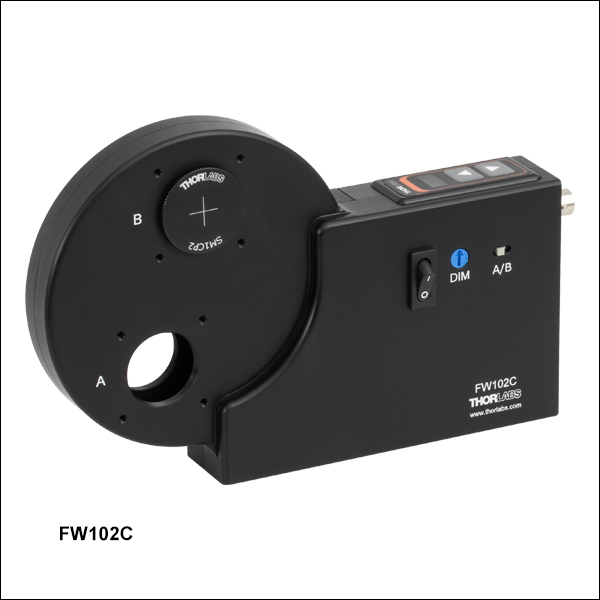
The FW102C and FW102CNEB 6-Position Motorized Filter Wheels are designed for Ø1" (Ø25 mm) optics and are sold without filters or preloaded with neutral density (ND) filters, respectively. Please see the table to the right for the included uncoated absorptive ND filters.
Each motorized filter wheel contains two internally SM1-threaded apertures, labeled A for the 210° position and B for the 0° position. The A/B switch allows one of the labeled ports to be designated as the primary port, and the filter wheel will rotate with respect to the primary port chosen. Filters can be manually selected using the push button on top of the unit or automated using the provided software. The current position of the filter wheel with respect to the selected port is shown on the display window. The brightness of this display can be adjusted with a small screwdriver at the hole labeled DIM, making this filter wheel appropriate for use in light sensitive applications.
The filter wheel included with each unit is fully interchangeable (see the animation in the Overview tab) by removing the front cover of the housing. A selection of 6- and 12-position filter wheels, with and without preloaded ND filters, is available below.
Two SM1CP2 SM1-threaded end caps and six SM1RR Retaining Rings are provided with the filter wheel; additional quantities can be purchased separately. A region-specific power cord is selected at the time of purchase.
 Zoom
Zoom
Click to Enlarge
The 12-position filter wheel is also available with preloaded ND filters (FW212CNEB). See the table to the left for included filters.
| Preloaded Filter Wheels (Item # FW212CNEB) |
|||
|---|---|---|---|
| Position | Filter ODa | Position | Filter ODa |
| 1 | Empty | 7 | 0.6 |
| 2 | 0.1 | 8 | 1.0 |
| 3 | 0.2 | 9 | 1.3 |
| 4 | 0.3 | 10 | 2.0 |
| 5 | 0.4 | 11 | 3.0 |
| 6 | 0.5 | 12 | 4.0 |
- 12-Position Motorized Wheel for Ø1/2" (Ø12.5 mm) Optics
- Maximum Optic Thickness Accepted: 0.25" (6.35 mm)
- Available With (Item # FW212CNEB) or Without (Item # FW212C) Preloaded Absorptive ND Filters
- Four SM1A6FW SM1-to-SM05 Adapters, Two SM05CP2 SM05-Threaded End Caps, and Twelve SM05RR Retaining Rings are Included
- Filter Wheels are Interchangeable
The FW212C and FW212CNEB 12-Position Motorized Filter Wheels are designed for Ø1/2" (Ø12.5 mm) optics and are sold without filters or preloaded with neutral density (ND) filters, respectively. Please see the table to the right for the included uncoated absorptive ND filters.
Each motorized filter wheel contains two internally SM1-threaded apertures, labeled A for the 210° position and B for the 0° position. The A/B switch allows one of the labeled ports to be designated as the primary port, and the filter wheel will rotate with respect to the primary port chosen. Filters can be manually selected using the push button on top of the unit or automated using the provided software. The current position of the filter wheel with respect to the selected port is shown on the display window. The brightness of this display can be adjusted for light-sensitive applications with a small screwdriver at the hole labeled DIM.
The filter wheel included with each unit is fully interchangeable (see the animation in the Overview tab) by removing the front cover of the housing. A selection of 6- and 12-position filter wheels, with and without preloaded ND filters, is available below.
Two SM05CP2 SM05-threaded end caps, four SM1A6FW SM1-to-SM05 Thread Adapters, and twelve SM05RR Retaining Rings are provided with the filter wheel; additional quantities can be purchased separately. A region-specific power cord is selected at the time of purchase.
 Zoom
Zoom| Preloaded Filter Wheels | |||
|---|---|---|---|
| 6-Position Wheel (FW102CWNEB) | |||
| Position | Filter ODa | Position | Filter ODa |
| 1 | Empty | 4 | 2.0 |
| 2 | 0.5 | 5 | 3.0 |
| 3 | 1.0 | 6 | 4.0 |
| 12-Position Wheel (FW212CWNEB) | |||
| Position | Filter ODa | Position | Filter ODa |
| 1 | Empty | 7 | 0.6 |
| 2 | 0.1 | 8 | 1.0 |
| 3 | 0.2 | 9 | 1.3 |
| 4 | 0.3 | 10 | 2.0 |
| 5 | 0.4 | 11 | 3.0 |
| 6 | 0.5 | 12 | 4.0 |

Click to Enlarge
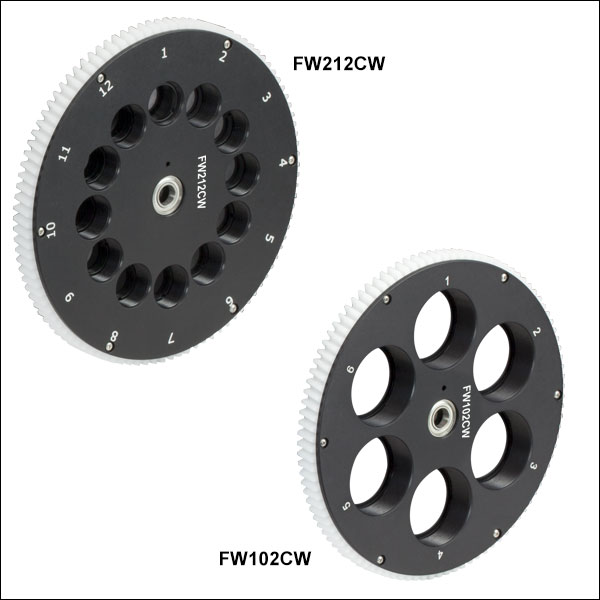
The 6- and 12-Position Filter Wheels Are Also Available with Preloaded ND Filters (See Table to the Right)
- Additional, Interchangeable Filter Wheels for the Motorized Housings Above
- 6- and 12-Position Filter Wheels for Ø1" (25 mm) and
Ø1/2" (12.5 mm) Optics, Respectively - Maximum Optic Thickness: 0.25" (6.35 mm)
These 6- and 12-Position Filter Wheels are available with or without preloaded, uncoated, absorptive ND filters. They are compatible with our entire line of motorized filter wheels shown above. The 6-position wheels are designed to accept Ø1" (25 mm) optics while the 12-position wheels are designed for Ø1/2" (12.5 mm) optics. The filters included with the preloaded wheels are listed in the table to the right.
Step-by-Step Switching Directions
The Overview tab contains an animation that shows how to switch between a 6- and 12-position filter wheel. To switch between two filter wheels with the same number of positions, turn off the power to the motorized filter wheel, unscrew the thumbscrew on the front of the housing, and remove the front cover. The filter wheel can then be removed and another wheel can then be inserted. To switch between a 6-position and a 12-position wheel, follow the same process. However, when the front cover is reattached, you must adjust the settings of the motorized filter wheel to the new number of positions. This is done by holding the top two arrow buttons for approximately three seconds and then changing the filter position value to either six or twelve.
 Motorized Filter Wheels